\(k\)-Nearest Neighbors, Curse of Dimensionality, and Naive Bayes
Learning Outcomes
In this lecture we introduce a second classification technique, \(k\)-Nearest Neighbors, and a third, Naive Bayes. After it, and the in-class activity, you will be able to
Explain what \(k\)-NN does at training time and at test time, say why it is nonparametric, and predict its output by hand from a table of distances.
Choose \(k\) on held-out validation data as the bias–variance knob, reading the error bars over repeated splits honestly.
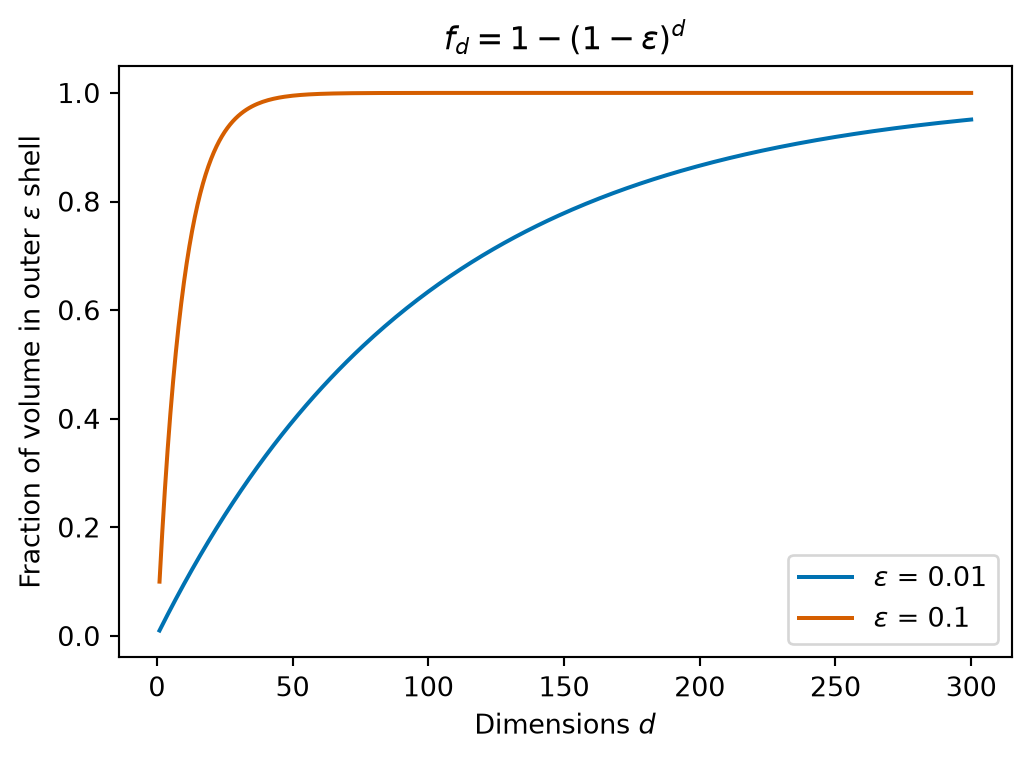
Quantify the curse of dimensionality – empty bins, the outer-shell fraction \(1-(1-\epsilon)^d\), distance concentration – and explain what it does to the word “nearest”.
Evaluate a classifier beyond a single accuracy number: read a confusion matrix and compute precision and recall for the class that matters.
Compute Naive Bayes by hand – priors, per-feature conditionals, the zero-count veto and Laplace smoothing – and explain why it dodges the curse that defeats \(k\)-NN.
\(k\)-Nearest Neighbors
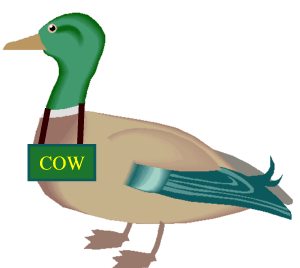
When I see a bird that walks like a duck and swims like a duck and quacks like a duck, I call that bird a duck.
–James Whitcomb Riley (1849 - 1916)
Like any classifier, \(k\)-Nearest Neighbors is trained by providing it a set of labeled data.
However, at training time, the classifier does very little. It just stores away the training data.
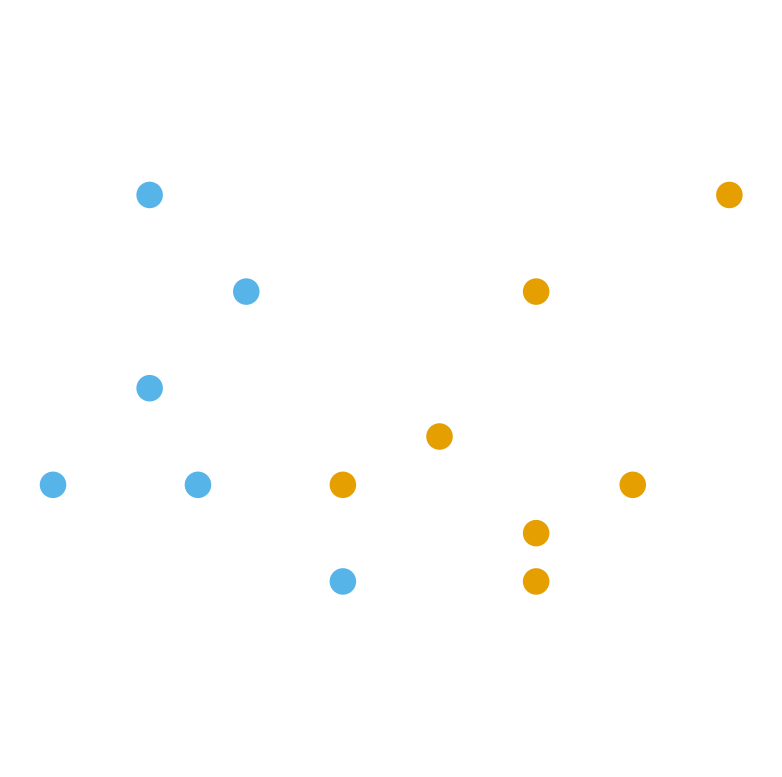
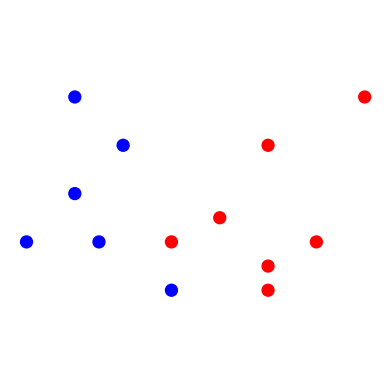
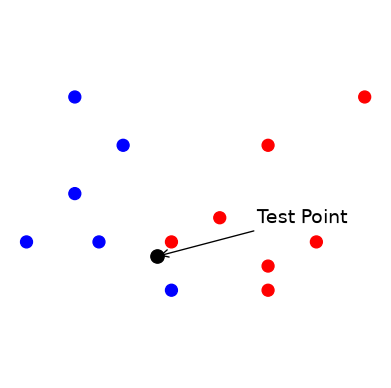
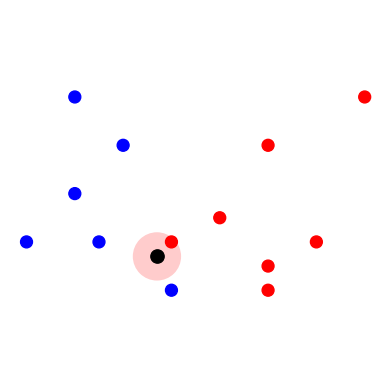
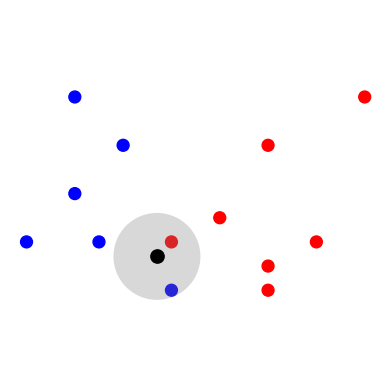
Two sky-blue neighbours against one orange: 3-NN predicts sky blue (label 1).
The Same Thing as a Distance Table
The pictures hide the arithmetic. Here are the five training points nearest to the test point \(\mathbf{x} = (-0.3, 0.7)\), sorted by Euclidean distance:
\(k = 5\): \(\{0, 1, 1, 0, 1\}\)\(\rightarrow\)sky blue, but now by 3 votes to 2.
This is all a \(k\)-NN classifier ever does: sort the distances, take the top \(k\), count the labels.
Hard vs. Soft Classification
\(k\)-Nearest Neighbors can do either hard or soft classification.
As a hard classifier, it returns the majority vote of the labels on the \(k\) Nearest Neighbors.
As a soft classifier, it returns the fraction of points in the neighborhood with label \(c\):
\[
p(y = c \mid \mathbf{x}, k) = \frac{\text{number of the } k \text{ neighbours with label } c}{k}.
\]
For the test point above, \(p(y = 1 \mid \mathbf{x}, 3) = 2/3\) and \(p(y = 1 \mid \mathbf{x}, 5) = 3/5\).
Ties. With two classes and an even \(k\), the vote can split evenly – the \(k = 2\) picture above is one such case. The usual fix is to use an odd\(k\) for binary problems. (If you don’t, scikit-learn silently breaks the tie in favour of the smaller label, which is not a decision you want made for you.)
Parametric vs. Nonparametric Models
Notice what \(k\)-NN stores: the entire training set. There is no fixed set of parameters that summarise the data – the data is the model. That makes \(k\)-NN our first nonparametric model.
Parametric models
have a fixed number of parameters, however much training data there is
are (usually) fast to apply once trained
make strong assumptions about the data’s distribution
examples: linear and logistic regression (lectures 10–11), Naive Bayes (today)
Nonparametric models
have a number of “parameters” that grows with the training data
are more flexible
can be slow or memory-hungry on large datasets
examples: \(k\)-NN (today), decision trees and random forests (lecture 08)
Model Selection for \(k\)-NN
Each value of \(k\) results in a different “model”.
The complexity of the resulting model is therefore controlled by the hyperparameter \(k\).
We will want to select \(k\) using held-out data to avoid over-fitting.
Varying \(k\)
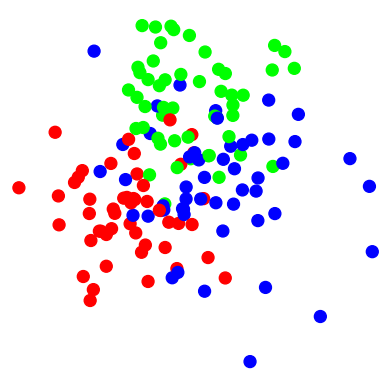
Consider this dataset where items fall into three classes:
Code
import sklearn.datasets as sk_dataX, y = sk_data.make_blobs(n_samples=150, centers=[[-2, 0],[1, 5], [2.5, 1.5]], cluster_std = [2, 2, 3], n_features=2, center_box=(-10.0, 10.0),random_state=0)plt.figure(figsize = (5, 5))plt.axis('equal')plt.axis('off')plt.scatter(X[:, 0], X[:, 1], c = y, cmap = cmap3_bold, s =80)plt.show()
Let’s observe how the complexity of the resulting model changes as we vary \(k\).
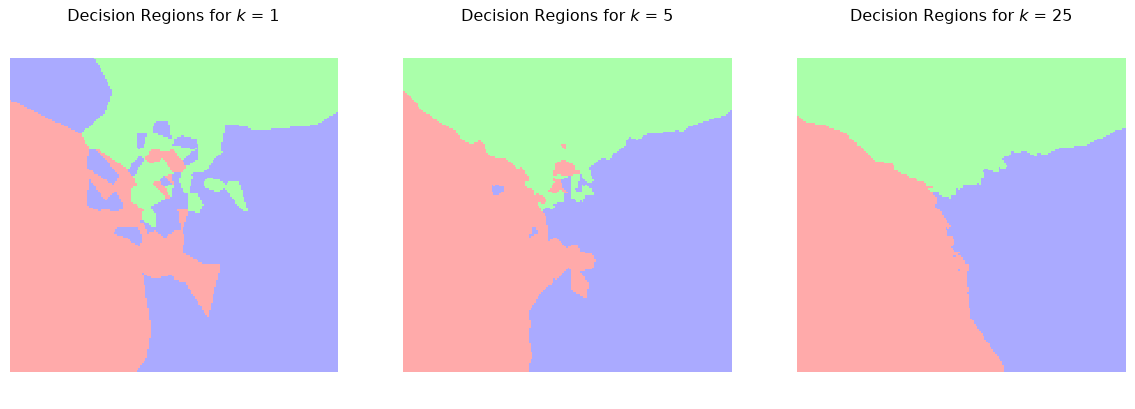
We’ll do this by plotting the decision regions. These show how the method would classify each potential test point in the space.
Decision Regions for Different Values of \(k\)
Code
# Plot the decision boundary. For that, we will assign a color to each# point in the mesh [x_min, x_max]x[y_min, y_max].h =.1# step size in the meshx_min, x_max = X[:, 0].min() -1, X[:, 0].max() +1y_min, y_max = X[:, 1].min() -1, X[:, 1].max() +1xx, yy = np.meshgrid(np.arange(x_min, x_max, h), np.arange(y_min, y_max, h))
Code
f, axs = plt.subplots(1, 3, figsize=(15, 4))for i, k inenumerate([1, 5, 25]): knn = KNeighborsClassifier(n_neighbors = k) knn.fit(X, y) Z = knn.predict(np.c_[xx.ravel(), yy.ravel()]) Z = Z.reshape(xx.shape) axs[i].pcolormesh(xx, yy, Z, cmap = cmap3_light, shading ='auto')# overlay the training points that produced these regions axs[i].scatter(X[:, 0], X[:, 1], c = y, cmap = cmap3_bold, s =25, edgecolors ='k', linewidths =0.5) axs[i].axis('equal') axs[i].axis('off') axs[i].set_title(f'Decision Regions for $k$ = {k}')plt.show()
With \(k = 1\) every training point owns a little island, so the boundary wraps around each stray point. Increasing \(k\) smooths the boundary: the stray points are out-voted by their neighbours.
Smoother boundaries are more likely to generalize well – but not always, as we will see.
Challenges for \(k\)-NN
Working with a \(k\)-NN classifier can involve some challenges.
The computational cost of classification grows linearly with the size of the training data. Note that the training step is trivial, but the classification step can be prohibitively expensive.
Euclidean distance is the most common distance function used in \(k\)-NN so data scaling is important. As previously discussed, features should be scaled to prevent distance measures from being dominated by a potentially small subset of features.
The curse of dimensionality. If the training data lives in a high dimensional space, Euclidean distance measures become less effective.
This last point is subtle but important, so we will now look at the curse of dimensionality more closely.
The Curse of Dimensionality
The Curse of Dimensionality
The curse of dimensionality is a somewhat tongue-in-cheek term for serious problems that arise when we use geometric algorithms in high dimensions.
There are various aspects of the curse that affect \(k\)-NN.
The phrase `curse of dimensionality’ was coined by the mathematician Richard Bellman in 1957 in his book Dynamic Programming.
Points are far apart in high D
\(k\)-NN relies on there being one or more “close” points to the test point \(x\).
In other words, we need the training data to be relatively dense, so there are “close” points everywhere.
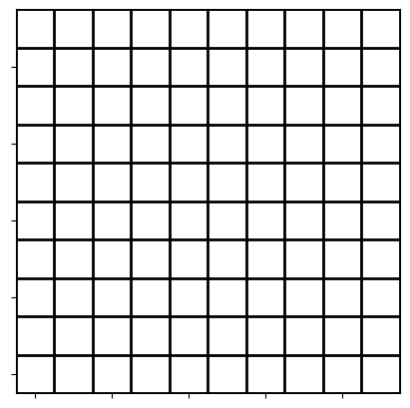
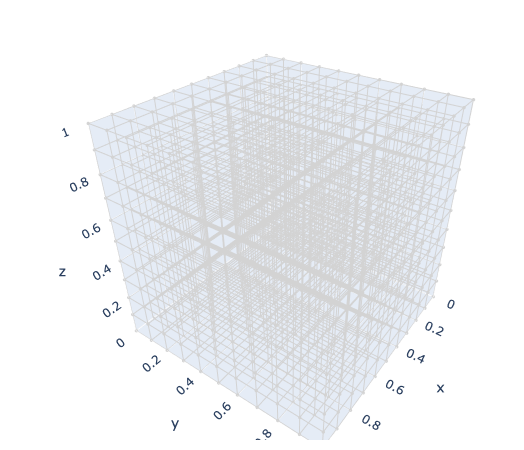
Unfortunately, the amount of space we work in grows exponentially with the dimension \(d\).
10x10 grid with \(10^2\) bins
10x10x10 grid with \(10^3\) bins
Imagine we have 10,000 (e.g. \(10^4\)) data points each with 40 features (e.g. \(d = 40\)).
Consider quantizing each dimension into 10 bins.
So in 40-D we have \(10^{40}\) possible bins.
On average, we will only have 1 data point per \(10^{36}\) bins. Most will be empty!!
So the amount of data we need to maintain a given density also grows exponentially with dimension \(d\).
One very intuitive way to think about it is this.
In order for two points to be close in \(\mathbb{R}^d\), they must be close in each of the \(d\) dimensions. As the number of dimensions grows, it becomes harder and harder for a pair of points to be close in each dimension.
Distances concentrate in high dimensions
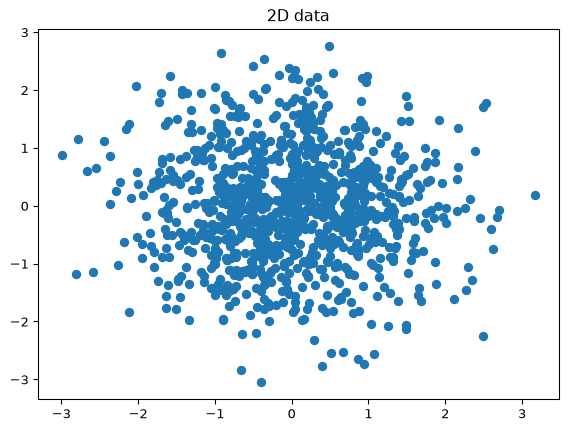
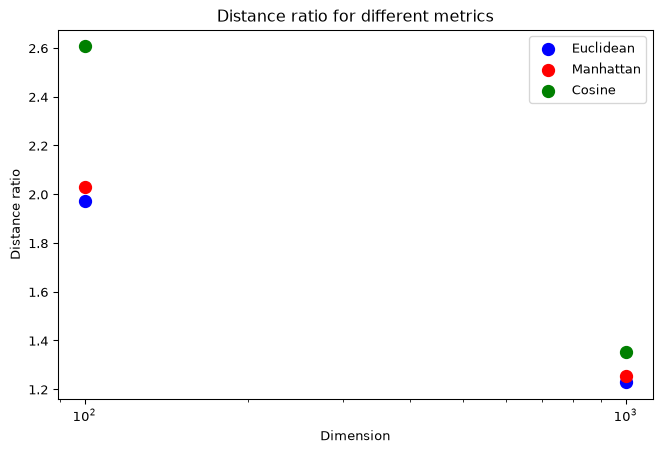
Being “far apart” is only half the story. The other half is that in high dimensions all pairs of points become nearly equally far apart, so “nearest” stops singling anything out.
Let’s measure this. For 1000 standard-normal points in \(d\) dimensions, we compute every pairwise distance and look at the ratio of the largest to the smallest:
Code
from scipy.spatial.distance import pdistrng = np.random.default_rng(0)n_data =1000dims = [2, 3, 10, 30, 100, 300, 1000]metrics_to_try = {'Euclidean': 'euclidean', 'Manhattan': 'cityblock', 'Cosine': 'cosine'}ratio = {name: [] for name in metrics_to_try}summary = []for d in dims: x = rng.normal(size=(n_data, d))for name, metric in metrics_to_try.items(): dists = pdist(x, metric) # all n(n-1)/2 pairwise distances ratio[name].append(dists.max() / dists.min())if name =='Euclidean': summary.append((d, dists.mean(), dists.std() / dists.mean()))
scipy.spatial.distance.pdist returns the \(n(n-1)/2\) distances between distinct pairs as a flat vector – the same computation as a double for loop, but fast.
Largest / smallest distance ratio
Code
plt.figure(figsize=(7, 4))for name, colour inzip(ratio, OKABE_ITO): plt.plot(dims, ratio[name], 'o-', color=colour, label=name)plt.axhline(1, linestyle='--', color='gray')plt.xscale('log')plt.yscale('log')plt.xlabel('Dimension $d$')plt.ylabel('max distance / min distance')plt.title('1000 random points: ratio of farthest to closest pair')plt.legend()plt.show()
A ratio of 1 (dashed) would mean every pair is at the same distance. All three metrics head toward it. Manhattan and cosine distance stay a little further from 1 than Euclidean, which is one reason they are sometimes preferred in high dimensions – but none escapes the trend.
Distances do not shrink – they concentrate
The mean Euclidean distance between random points actually grows with \(d\) (roughly like \(\sqrt{2d}\) for standard normals). What collapses is the spread around that mean:
Relative to the typical distance, the closest point is barely closer than a random one. That is what “nearest” means in 1000 dimensions.
Most of a ball is near its surface
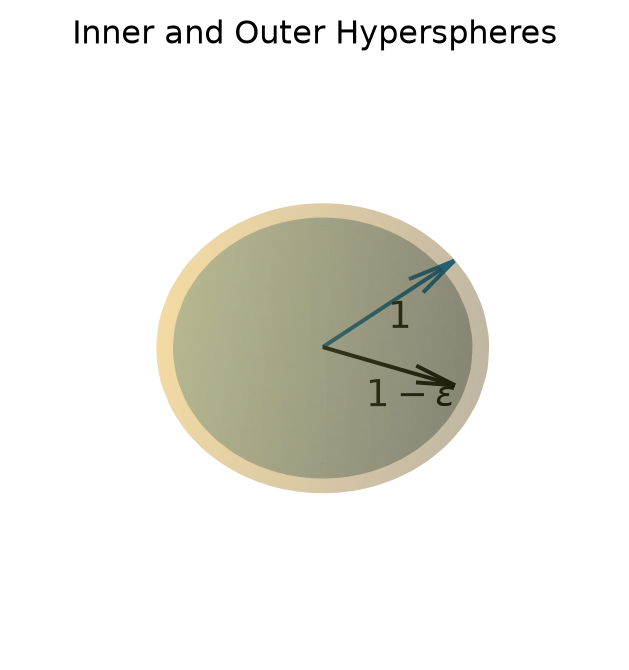
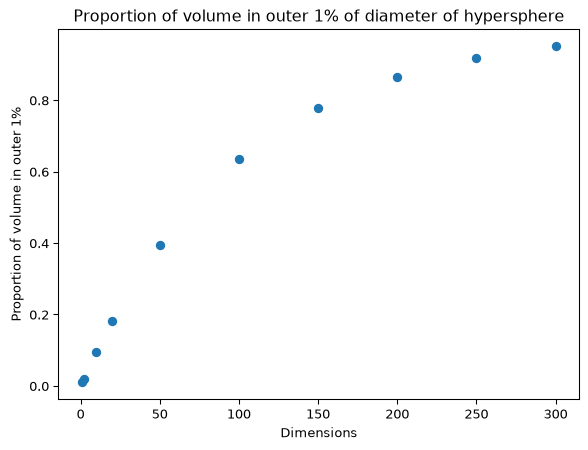
Here is a geometric way to see the same concentration. Compare a ball of radius \(1\) with the slightly smaller ball of radius \(1-\epsilon\) inside it:
Code
ax = plt.figure(figsize = (4, 4)).add_subplot(projection ='3d')# coordinates of sphere surfaceu, v = np.mgrid[0:2*np.pi:50j, 0:np.pi:50j]x = np.cos(u)*np.sin(v)y = np.sin(u)*np.sin(v)z = np.cos(v)#ax.plot_surface(x, y, z, color=OKABE_ITO[0], alpha =0.2)s3 =1/np.sqrt(3)ax.quiver(0, 0, 0, s3, s3, s3, color = OKABE_ITO[5])ax.text(s3/2, s3/2, s3/2-0.2, '1', size =14)#eps =0.9#ax.plot_surface(eps * x, eps * y, eps * z, color=OKABE_ITO[5], alpha =0.2)ax.quiver(0, 0, 0, eps, 0, 0, color ='k')ax.text(1/2-0.2, 0, -0.4, r'$1-\epsilon$', size =14)ax.set_axis_off()plt.title('Inner and Outer Hyperspheres')plt.show()
In 3-D the shell between them is thin. In high dimensions it is almost the whole ball.
Fraction of points in outer shell
What is the fraction \(f_d\) of all the points that are within a unit distance, but not within a distance of \(1-\epsilon\)?
The volume of a ball of radius \(R\) in \(d\) dimensions is \(K_d \times R^d\) for a constant \(K_d\) that depends only on \(d\) (\(K_2 = \pi\), \(K_3 = \tfrac{4}{3}\pi\); the general formula is in the note below). The \(R^d\) is all we need.
Then for \(R=1\) and \(R=1-\epsilon\) we have:
\[
\begin{align*}
f_d &= \frac{\text{Volume of Shell}}{\text{Volume of unit hypersphere}} \\
&= \frac{K_d\times(1)^d - K_d\times(1-\epsilon)^d}{K_d\times(1)^d} \\
&= 1 - (1-\epsilon)^d
\end{align*}
\]
Observe that \((1-\epsilon)^d\) goes to 0 as \(d \rightarrow \infty\) and \(f_d\rightarrow 1\) as \(d \rightarrow \infty\).
This means that as \(d\rightarrow \infty\), all of the points that are within 1 unit of our location, are almost exactly 1 unit from our location.
where \(\Gamma\) is Euler’s gamma function. For a positive integer \(n\), \(\Gamma(n) = (n-1)!\), so when \(d\) is even \(\Gamma(\tfrac d2 + 1) = (\tfrac d2)!\); for odd \(d\) there is a closed form involving \(\sqrt{\pi}\).
Code
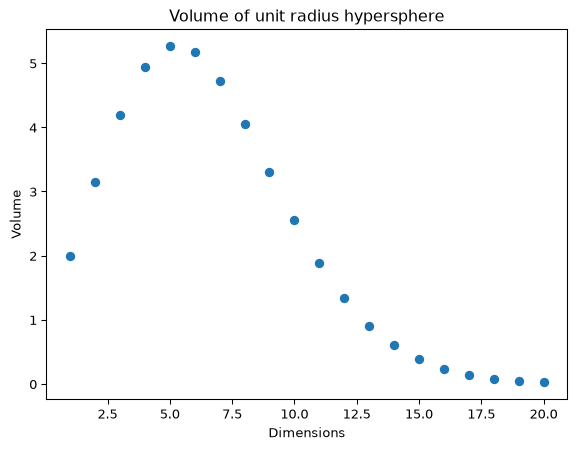
import scipy.special as scidef volume_of_hypersphere(radius, dimensions):return (np.pi ** (dimensions /2)) / sci.gamma(dimensions /2+1) * radius ** dimensionsvols = [volume_of_hypersphere(1.0, d) for d inrange(1, 21)]
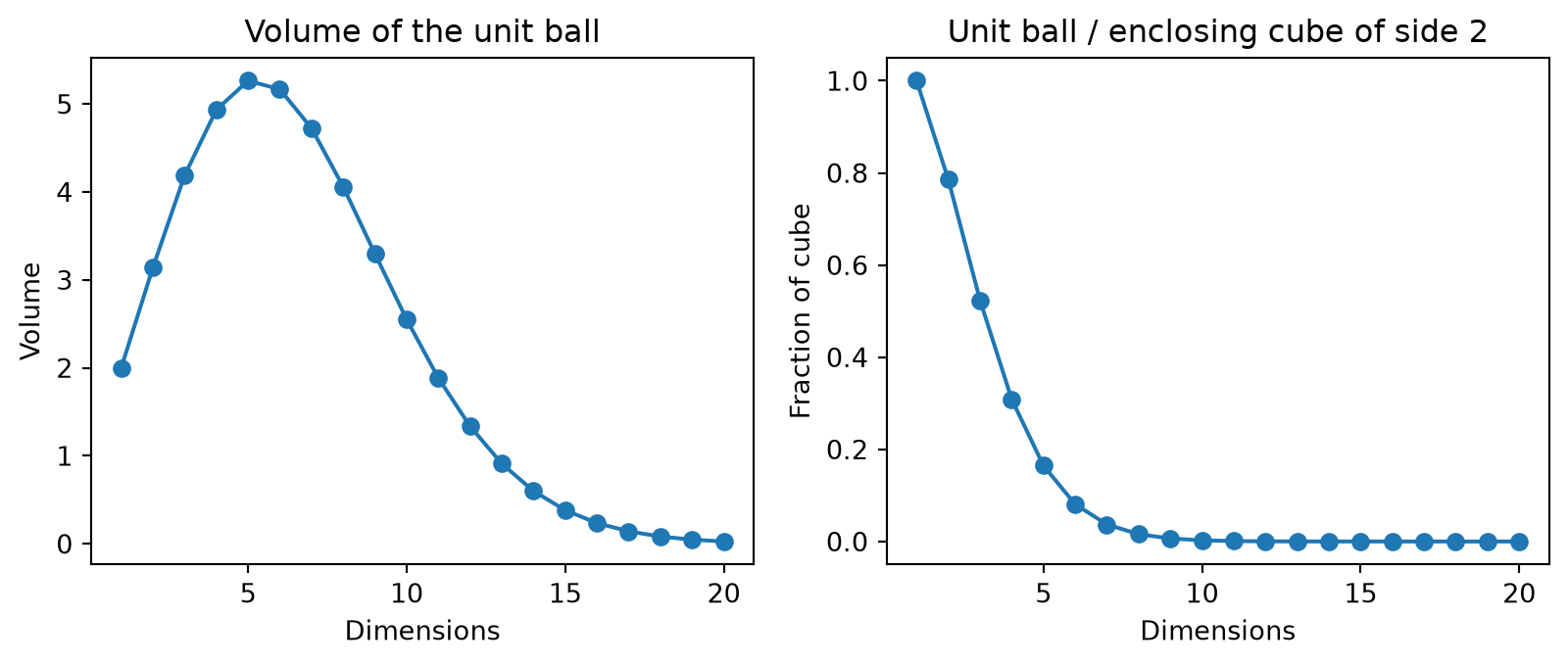
The volume of the unit ball peaks at \(d = 5\) and then shrinks toward zero, and the fraction of the enclosing cube \([-1, 1]^d\) that the ball occupies vanishes even faster – almost all of the cube is in its \(2^d\) corners.
Code
fig, axs = plt.subplots(1, 2, figsize = (10, 3.5))axs[0].plot(range(1, 21), vols, 'o-')axs[0].set_xlabel('Dimensions')axs[0].set_ylabel('Volume')axs[0].set_title('Volume of the unit ball')axs[1].plot(range(1, 21), [v /2** d for v, d inzip(vols, range(1, 21))], 'o-')axs[1].set_xlabel('Dimensions')axs[1].set_ylabel('Fraction of cube')axs[1].set_title('Unit ball / enclosing cube of side 2')plt.show()
For a fascinating exploration of the properties of unit spheres in high dimension, see An Adventure in the Nth Dimension by Brian Hayes in American Scientist.
Curse of Dimensionality Example
The following example is based on Data Science from Scratch, Joel Grus, Second Edition, Chapter 12.
Here’s another example, now with points spread uniformly rather than normally.
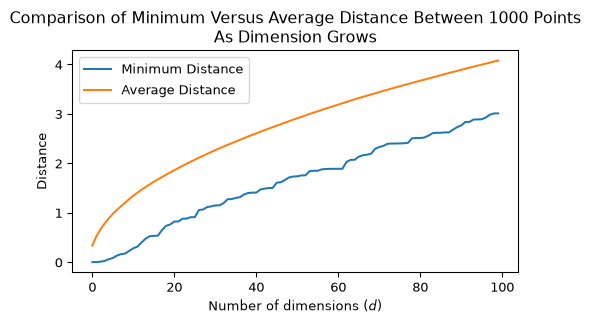
We create 1000 points, scattered at random within the unit cube in \(d\) dimensions, and add one dimension at a time.
We will look at two quantities as we vary \(d\).
The minimum distance between any two points.
The average distance between any two points.
Code
rng = np.random.default_rng(0) # seeded, so the figure is reproduciblensamples =1000unif_X = rng.uniform(0, 1, nsamples).reshape(-1, 1)dists = pdist(unif_X)mean_dists = [np.mean(dists)]min_dists = [np.min(dists)]for d inrange(2, 101): unif_X = np.column_stack([unif_X, rng.uniform(0, 1, nsamples)]) dists = pdist(unif_X) mean_dists.append(np.mean(dists)) min_dists.append(np.min(dists))
Code
plt.figure(figsize = (6, 3))plt.plot(range(1, 101), min_dists, label ="Minimum Distance")plt.plot(range(1, 101), mean_dists, label ="Average Distance")plt.xlabel(r'Number of dimensions ($d$)')plt.ylabel('Distance')plt.legend(loc ='best')plt.title(f'Comparison of Minimum Versus Average Distance Between {nsamples} Points\nAs Dimension Grows')plt.show()
The average distance between points grows. However we also observe that the minimum distance between points grows at a similar rate.
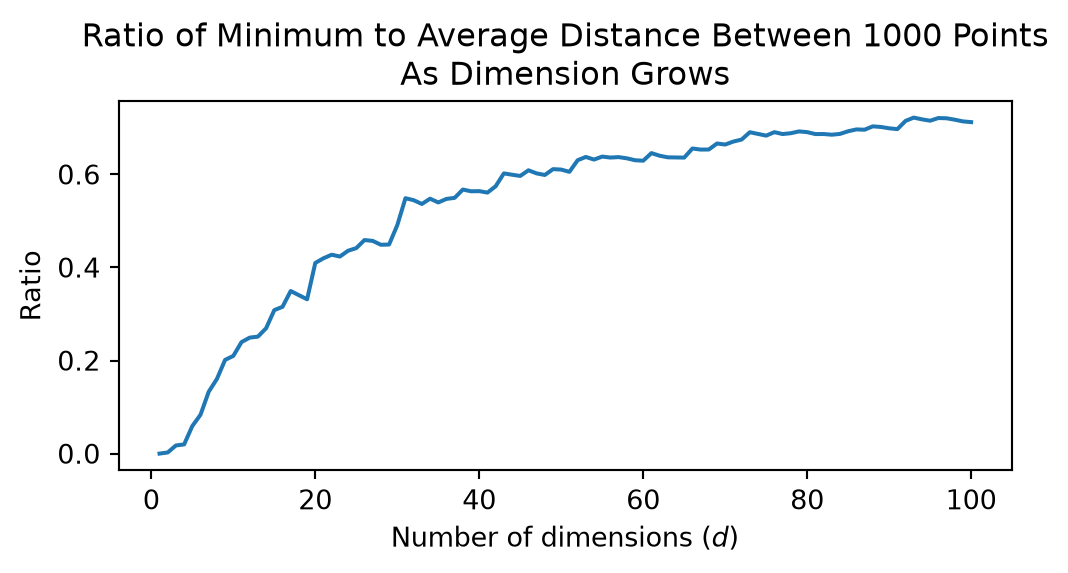
Let’s look at the ratio between the minimum distance between points and the average distance between points.
Code
plt.figure(figsize = (6, 2.5))plt.plot(range(1, 101), [a/b for a, b inzip(min_dists, mean_dists)])plt.xlabel(r'Number of dimensions ($d$)')plt.ylabel('Ratio')plt.title(f'Ratio of Minimum to Average Distance Between {nsamples} Points\nAs Dimension Grows')plt.show()
This shows that, for any test point \(x\), the distance to the closest point to \(x\), gets closer and closer to the average distance between points.
If we used a point at the average distance for classifying \(x\) we’d get a very poor classifier.
Implications of the Curse
For \(k\)-NN, the Curse of Dimensionality means that in high dimensions most points are nearly the same distance from the test point.
This makes \(k\)-NN ineffective. It cannot reliably tell which are the \(k\) nearest neighbors and its performance degrades as \(d\) increases.
What Can be Done?
The problem is that you simply cannot have enough data to do a good job using \(k\)-NN in high dimensions.
Alternative approaches to mitigate this issue
Use a different dissimilarity metric
For example cosine distance behaves a little better, but you will have to decide if it is a good distance function for your problem.
Reduce the dimension of your data.
We will discuss dimensionality reduction techniques in lectures SVD I and SVD II.
More on Model Selection
Recall that each value of \(k\) provides a different model.
To better understand model selection, we need a way to evaluate our different models.
How do we evaluate a classifier?
Binary classification
In the simple case of a binary classifier, we call
one class the Positive class – usually the one we are trying to detect – and
the other class the Negative class.
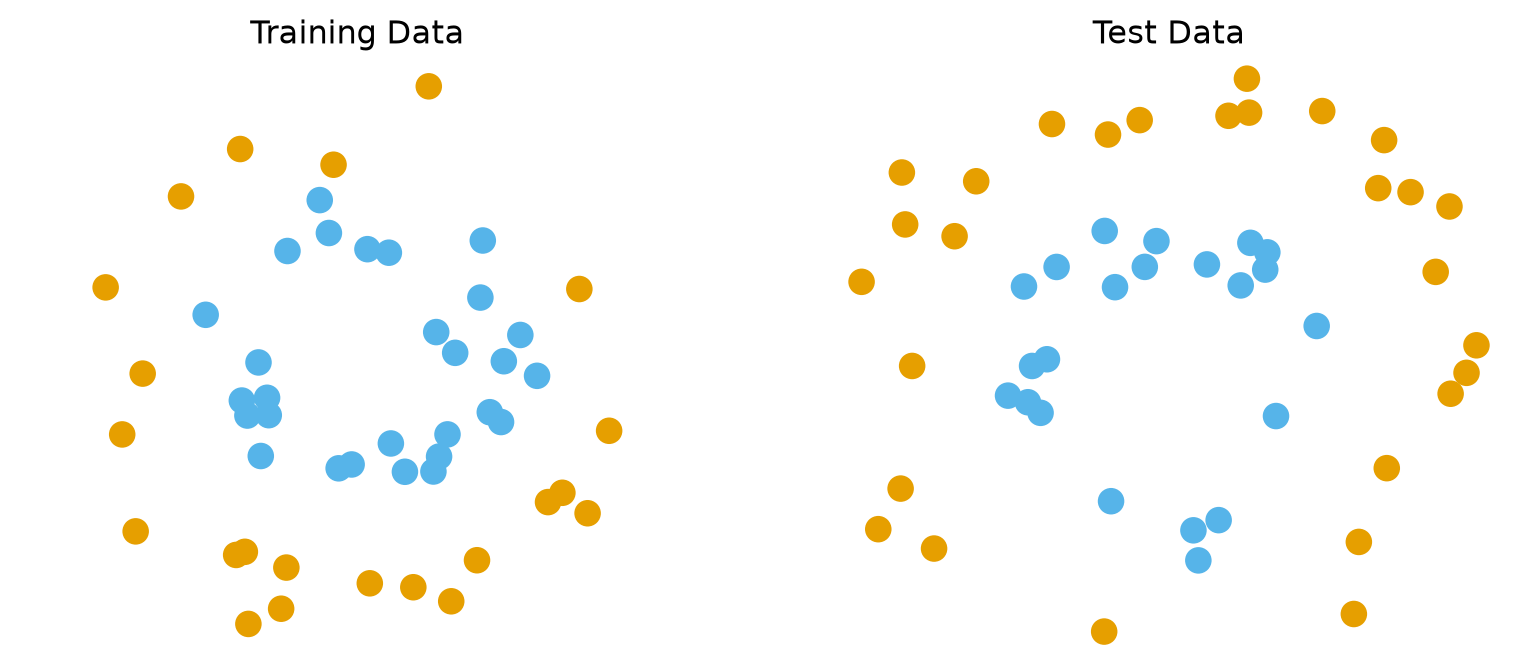
Which label is “Positive” is a convention we choose, and it has to be stated: in the two-circles example below, label 0 (orange) is the Positive class and label 1 (sky blue) is Negative.
The most basic measure of success for a classifier is accuracy:
Accuracy is the fraction of test points that are correctly classified.
Accuracy is important, however it may not convey enough useful information.
For example, let’s say we have a dataset showing class imbalance, e.g., 90% of the data are the Positive class and 10% are the Negative class.
For this dataset, consider a classifier that always predicts ‘Positive’.
Its accuracy is 90%, but it is not an effective classifier.
Precision and Recall
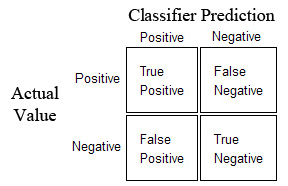
A better way to measure the classifier’s performance is using a Confusion Matrix.
Diagonal elements represent successes and off diagonals represent errors.
Using the confusion matrix we can define some more useful measures:
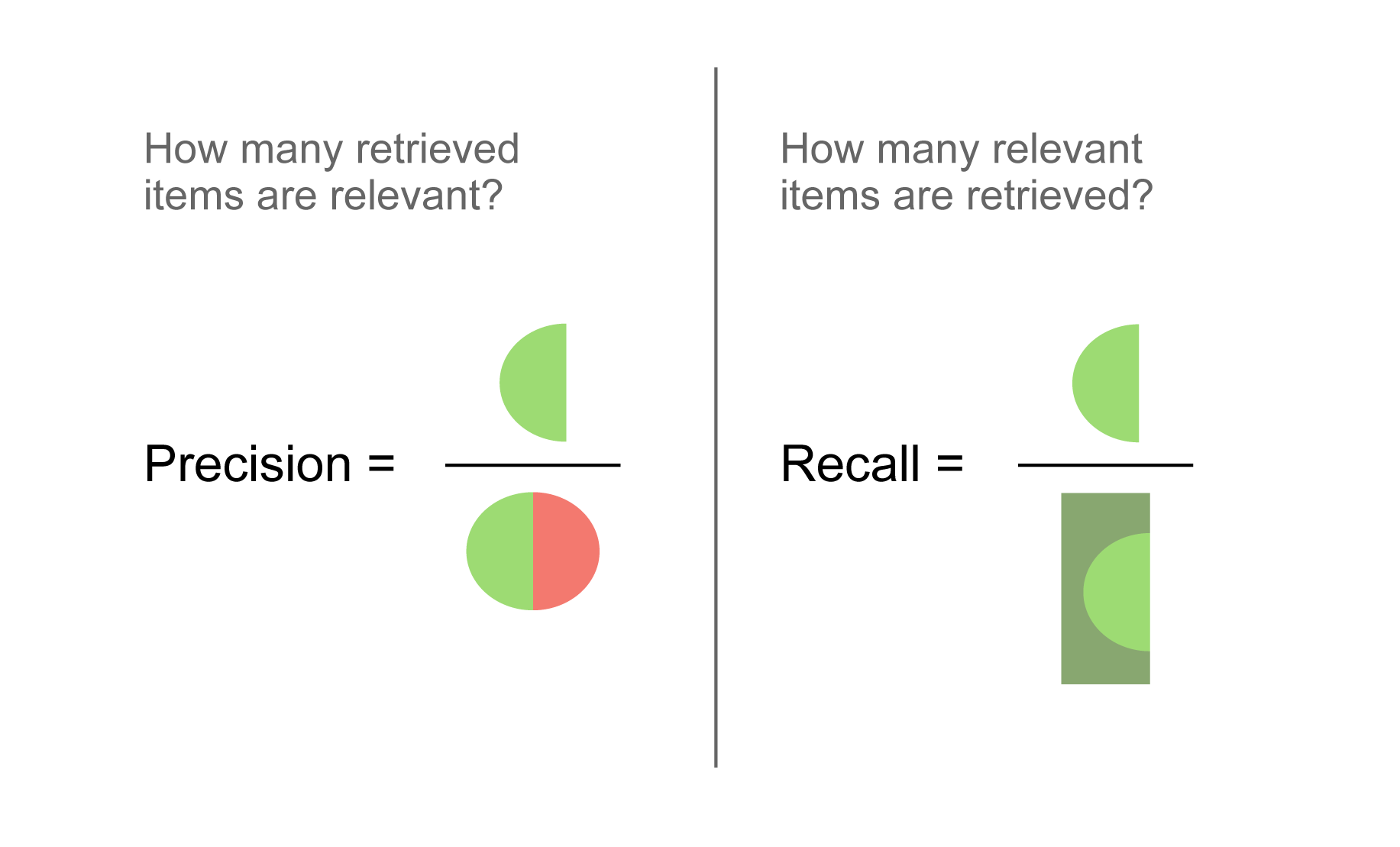
Recall - defined as the fraction of actual positives correctly classified
TP/(TP + FN)
Precision - defined as the fraction of classified positives correctly classified
TP/(TP + FP)
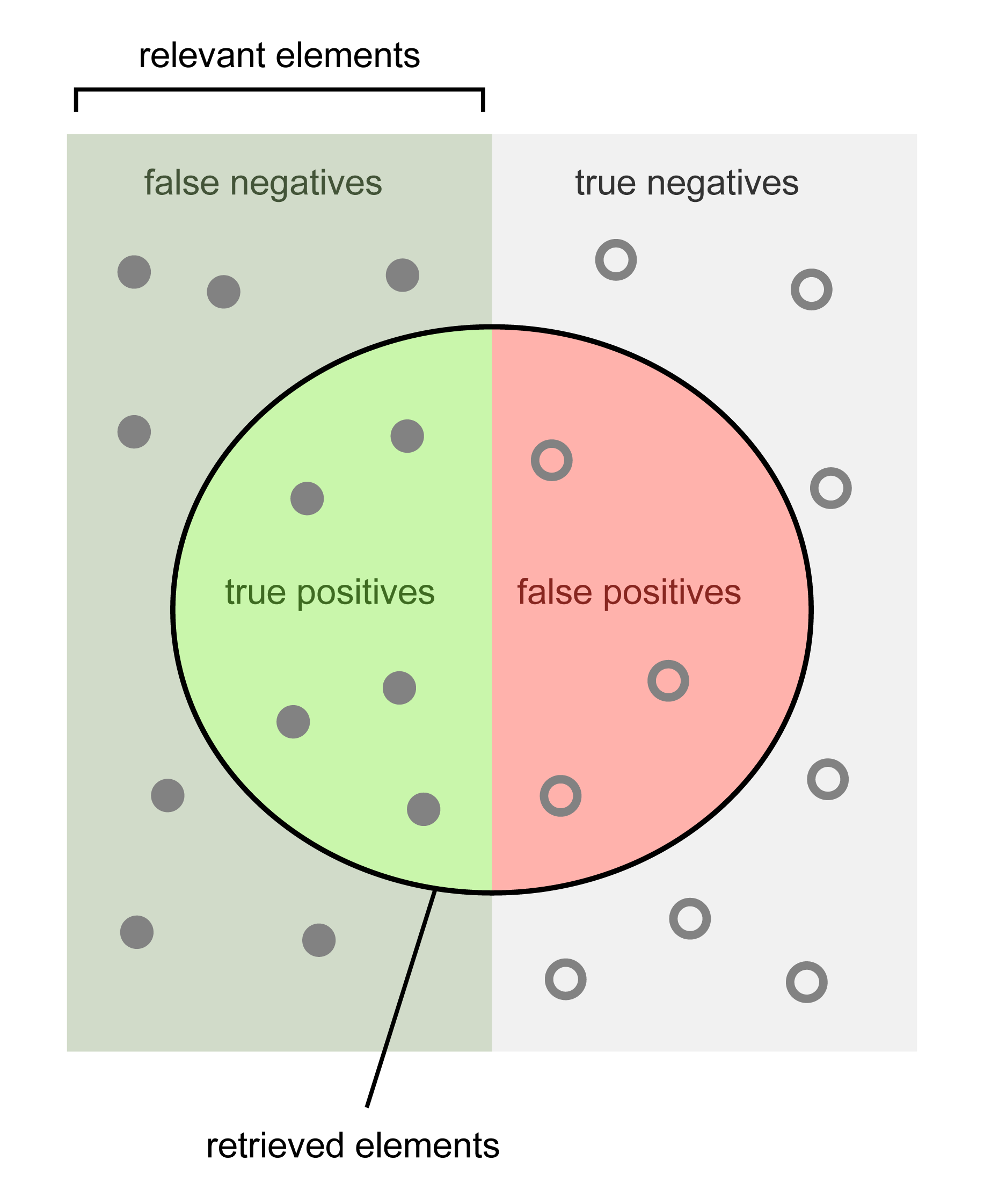
Precision and Recall Illustration
Evaluating \(k\)- Nearest Neighbors
First we’ll generate some synthetic data to work with.
For our first example, we will classify the points (in the two classes) using a \(k\)-NN classifier.
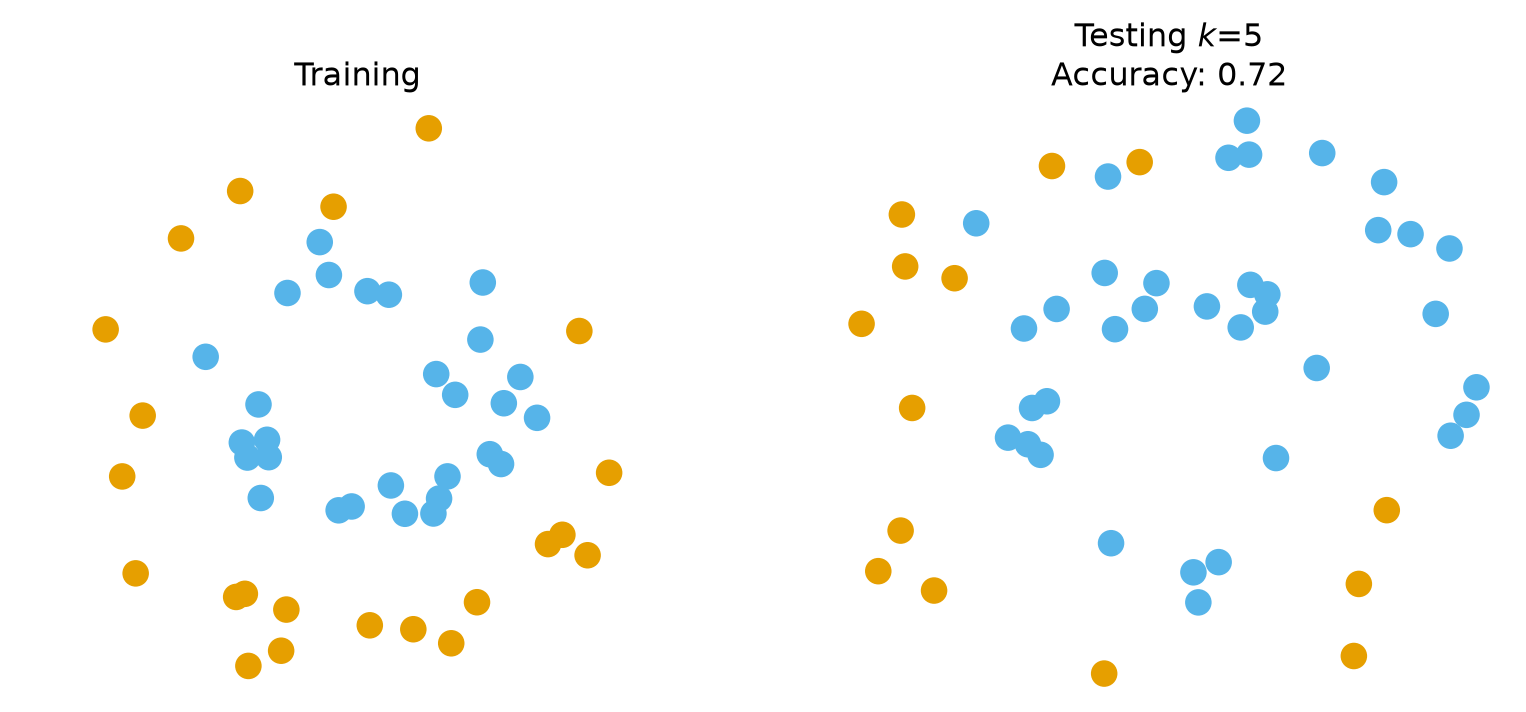
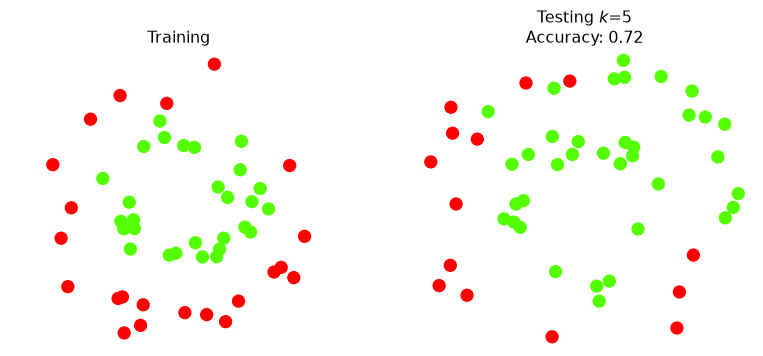
We will specify that \(k=5\), i.e., we will classify based on the majority vote of the 5 nearest neighbors.
Code
k =5knn5 = KNeighborsClassifier(n_neighbors = k)
As we have seen previously, the scikit-learnfit() function corresponds to training and the predict() function corresponds to testing.
Code
knn5.fit(X_train,y_train)print(f'Accuracy on test data: {knn5.score(X_test, y_test)}')
Accuracy on test data: 0.72
Accuracy of 72% sounds good – but let’s dig deeper.
Confusion Matrix
Recall our convention: the orange points (label 0) are the Positive class and the sky-blue points (label 1) are Negative. We pass labels=[0, 1] so that the rows and columns come out in the order we name them:
Reading across the rows: every Negative point is classified correctly, but only 14 of the 28 Positive points are. Reading down the first column: every point the classifier called Positive really is Positive.
That is, its precision is \(14/(14+0) = 100\%\), but its recall is only \(14/(14+14) = 50\%\).
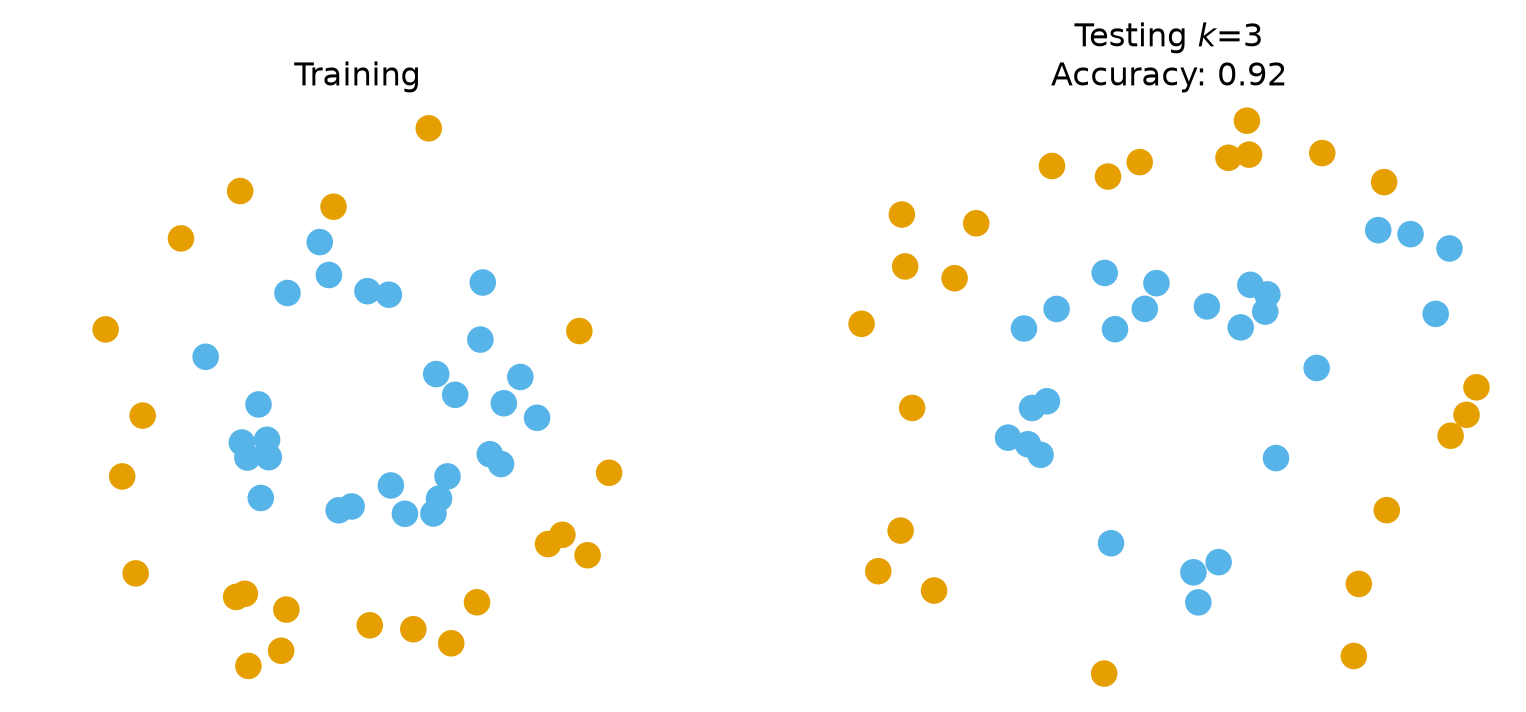
So how confident can we be that the accuracy of 92% for \(k = 3\) holds in general? Is \(k = 3\) really better than \(k = 5\), or did we get a lucky split?
What we really need to do is consider many different random splits.
But first, a word about names. We are about to use the held-out half of the data to choose\(k\). Lecture 07 named the roles: data held out from training to choose hyperparameters is the validation set; the test set is touched once, at the very end, to report the final number. From here on the held-out split is called validation.
The protocol for choosing a hyperparameter is therefore:
Form a random train/validation split
Train the classifier on the training split
Score the classifier on the validation split
Accumulate statistics
Repeat from step 1 until enough statistics have been collected
– and do all of this for each candidate value of \(k\).
Because this is a binary problem we sweep odd\(k\) only, so that no vote can tie.
Code
import sklearn.model_selection as model_selectionnreps =50kvals =range(1, 16, 2)acc = []se = []np.random.seed(4)for k in kvals: val_rep = [] train_rep = []for i inrange(nreps): X_train, X_val, y_train, y_val = model_selection.train_test_split(X, y, test_size =0.5) knn = KNeighborsClassifier(n_neighbors = k) knn.fit(X_train, y_train) train_rep.append(knn.score(X_train, y_train)) val_rep.append(knn.score(X_val, y_val)) acc.append([np.mean(val_rep), np.mean(train_rep)]) se.append(np.std(val_rep) / np.sqrt(nreps)) # standard error of the meanaccy = np.array(acc)
Code
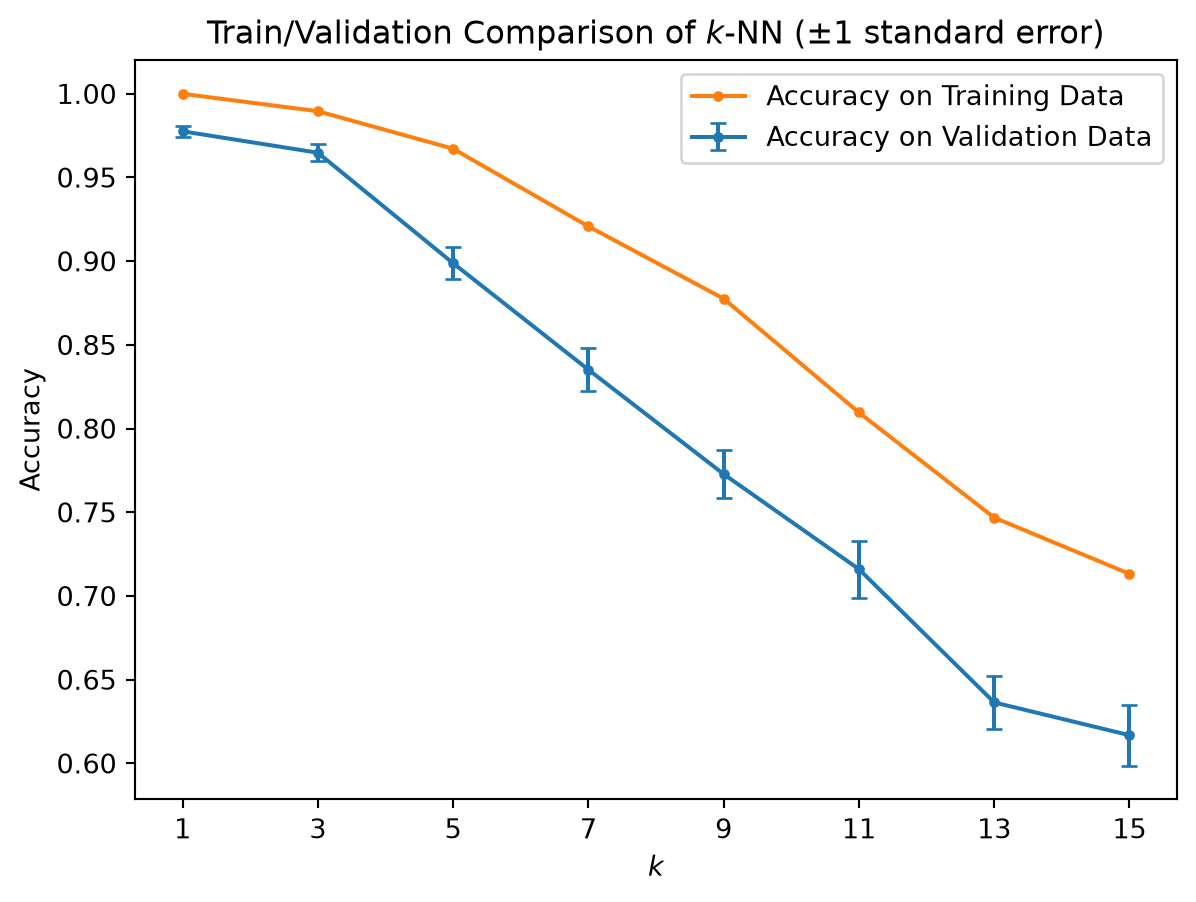
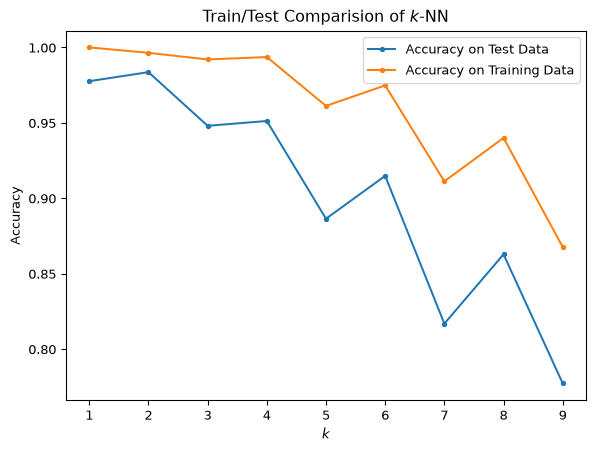
plt.errorbar(kvals, accy[:, 0], se, fmt ='.-', capsize =3, label ='Accuracy on Validation Data')plt.plot(kvals, accy[:, 1], '.-', label ='Accuracy on Training Data')plt.xlabel(r'$k$')plt.ylabel('Accuracy')plt.xticks(kvals)plt.title(r'Train/Validation Comparison of $k$-NN ($\pm 1$ standard error)')plt.legend(loc ='best')plt.show()print(f'Best validation accuracy at k = {kvals[np.argmax(accy[:, 0])]}: {np.max(accy[:, 0]):.3f}')
Best validation accuracy at k = 1: 0.978
Based on validation accuracy, \(k = 1\) is the best choice here, with \(k = 3\) just behind and every \(k \ge 5\) clearly worse.
The training curve is useless for this decision: at \(k = 1\) it is 100% by construction, because every training point is its own nearest neighbour.
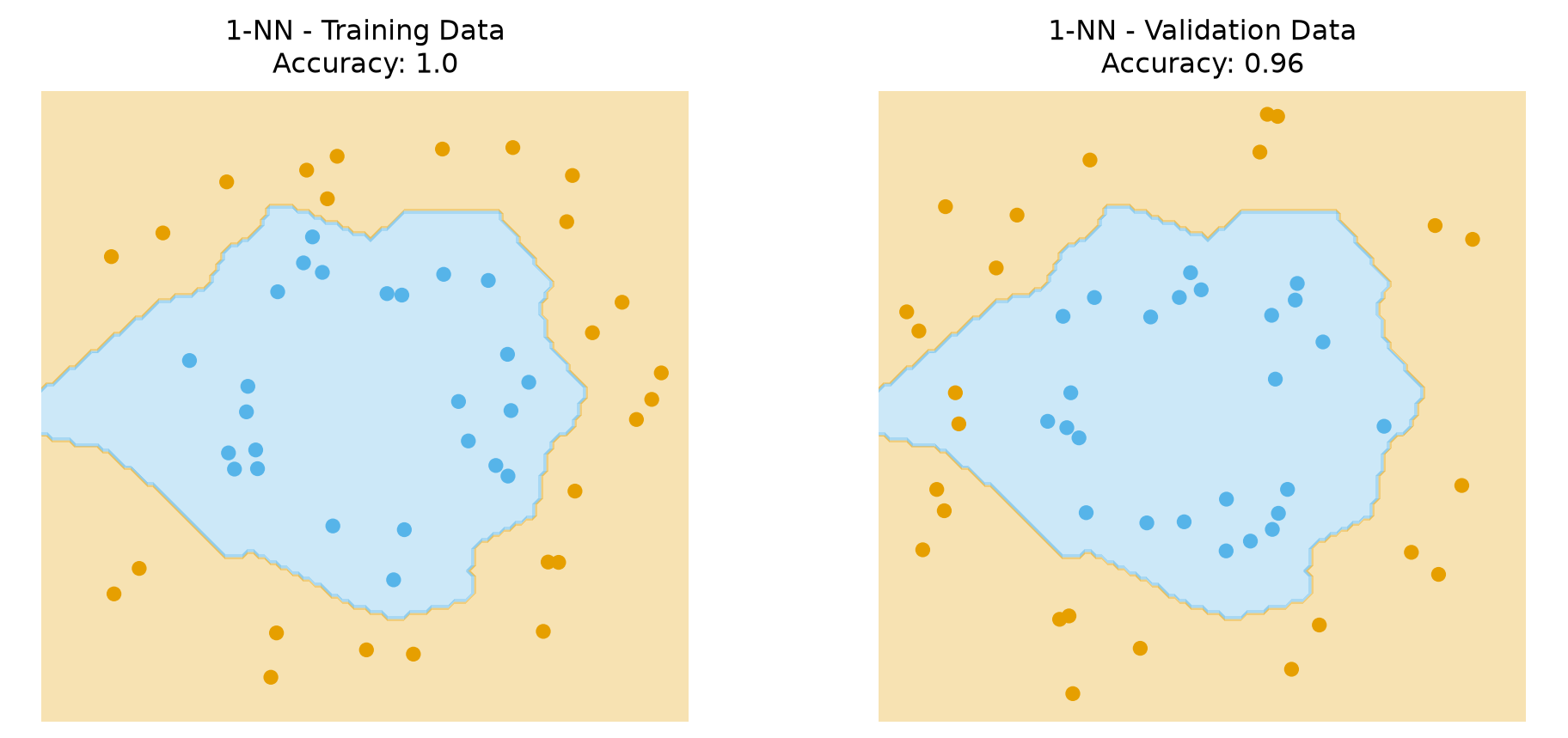
The data decide, not a preference for smooth boundaries. These two rings are cleanly separated with little label noise, so a very local model wins. On noisier data the validation curve would peak at a larger \(k\).
Here is the decision boundary for \(k\)-NN with \(k = 1\).
Ignoring fixed x limits to fulfill fixed data aspect with adjustable data limits.
Ignoring fixed x limits to fulfill fixed data aspect with adjustable data limits.
Real Data
To explore a few more issues, we’ll now turn to some famous datasets that have been extensively studied in the past.
The Iris Dataset
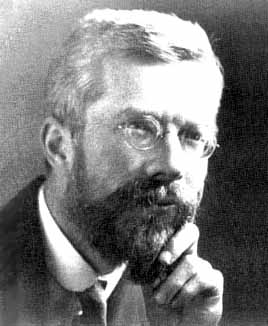
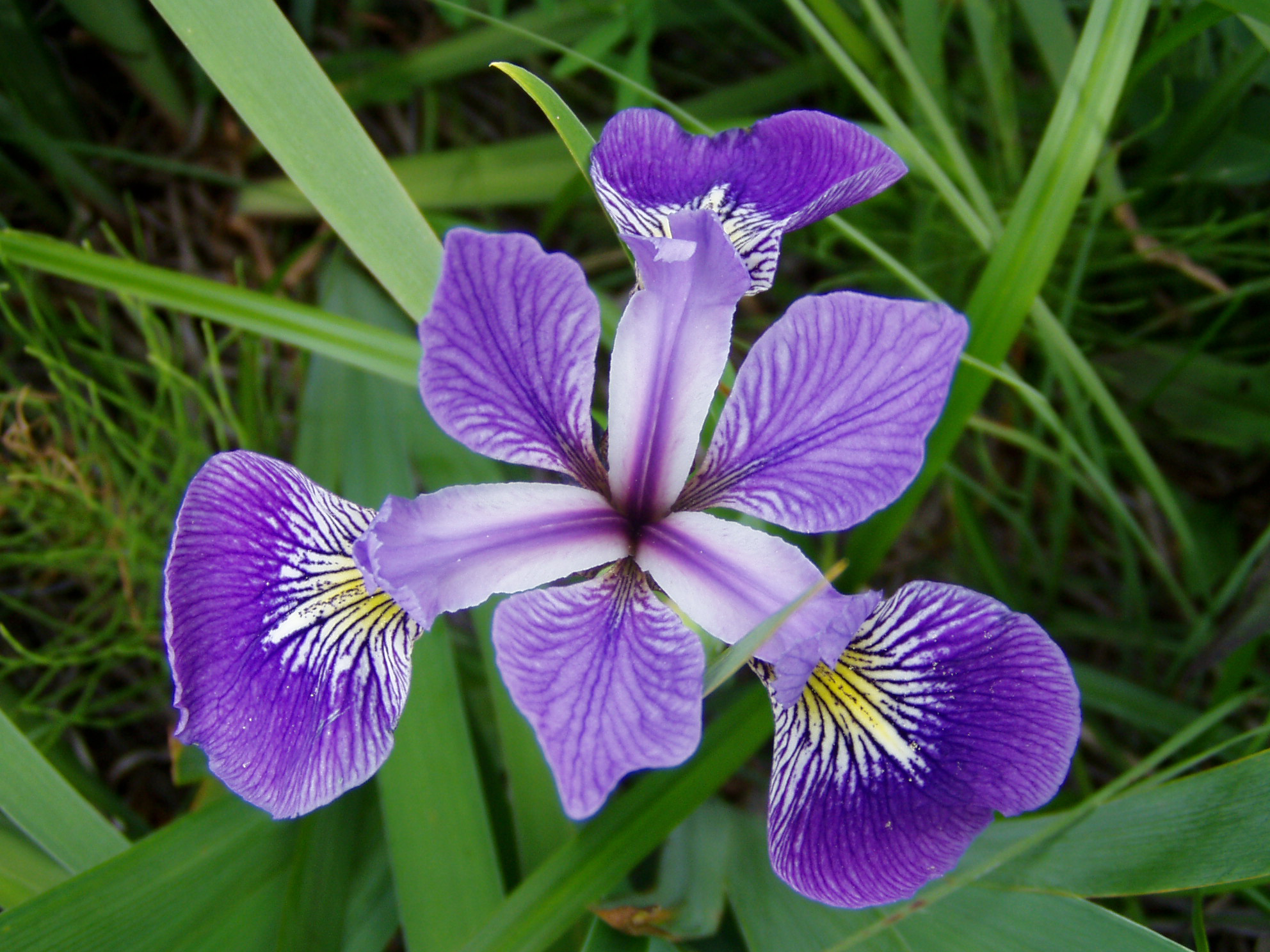
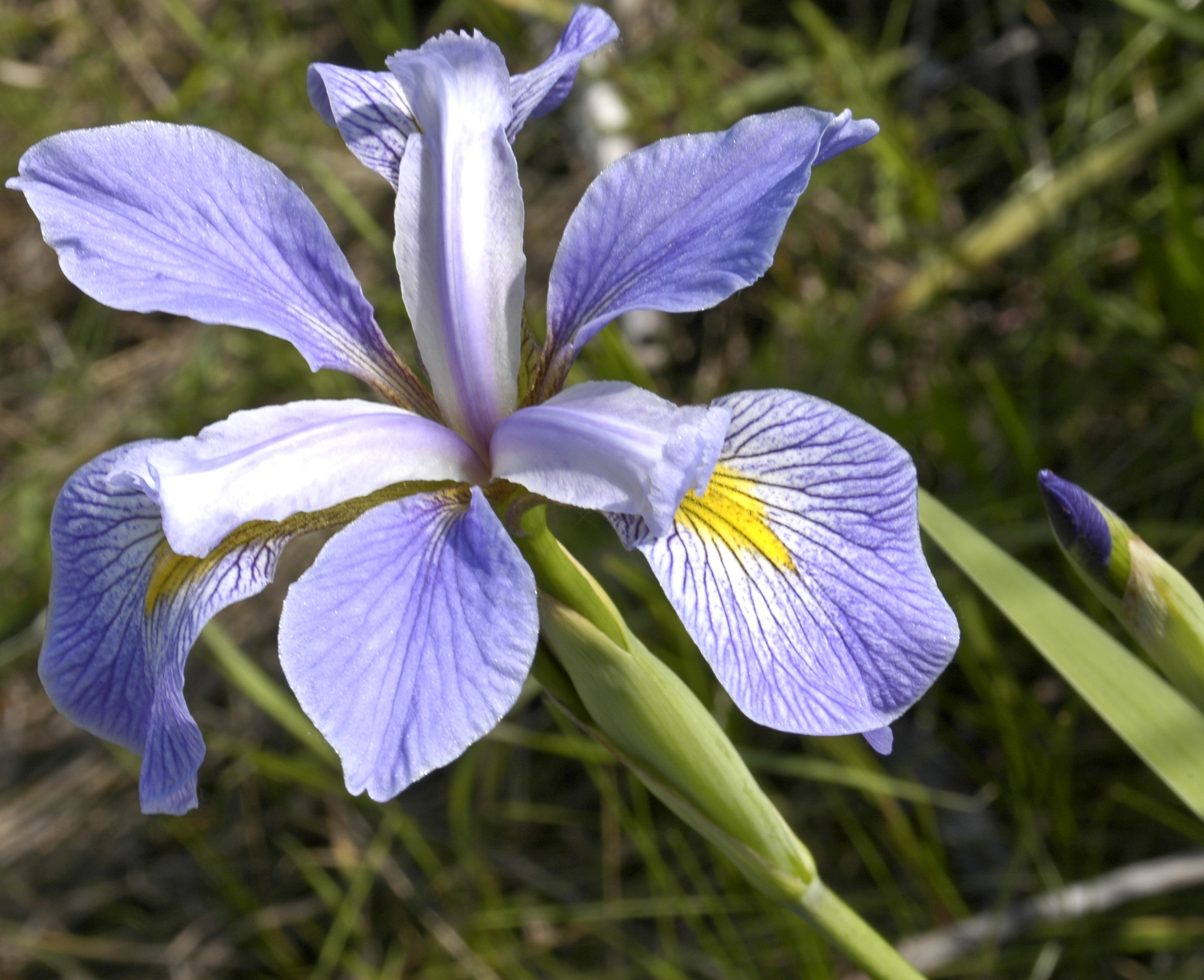
The Iris dataset is a famous dataset used by Ronald Fisher in a classic 1936 paper on classification.
R. A. Fisher
Quoting from Wikipedia:
The data set consists of 50 samples from each of three species of Iris (Iris setosa, Iris virginica and Iris versicolor). Four features were measured from each sample: the length and the width of the sepals and petals, in centimetres. Based on the combination of these four features, Fisher developed a linear discriminant model to distinguish the species from each other.
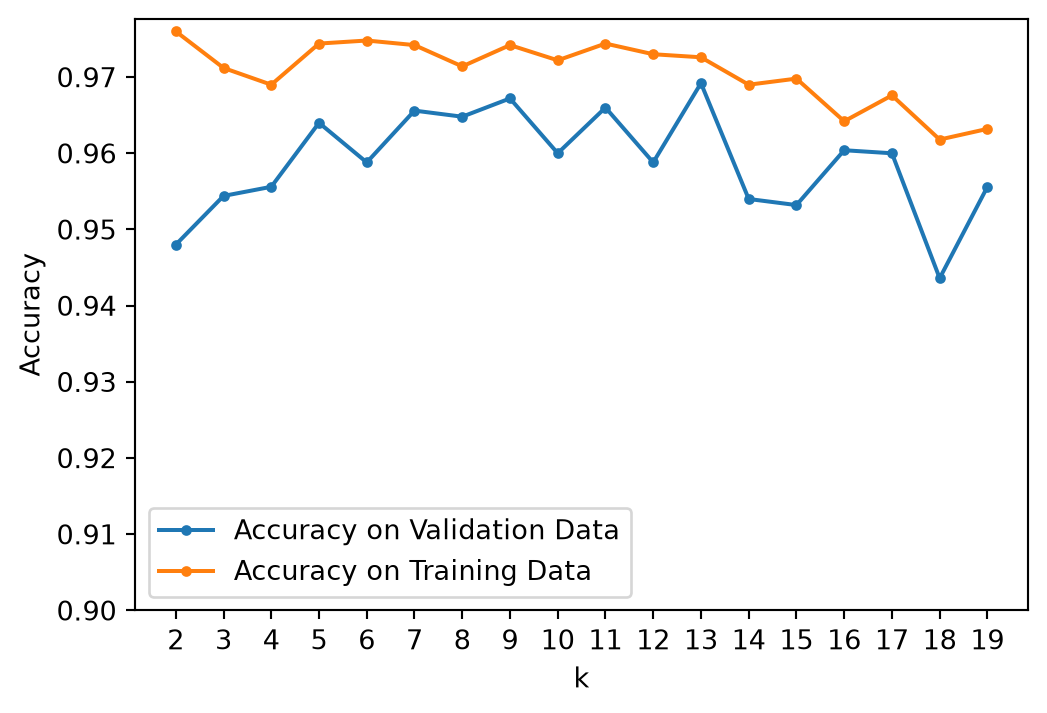
plt.errorbar(kvals, accy[:, 0], stds[:, 0], label ='Accuracy on Validation Data')plt.xlabel('k')plt.ylabel('Accuracy')plt.legend(loc ='lower center')plt.xticks(kvals)plt.title(r'Validation Accuracy with $\pm 1\sigma$ Errorbars')plt.show()
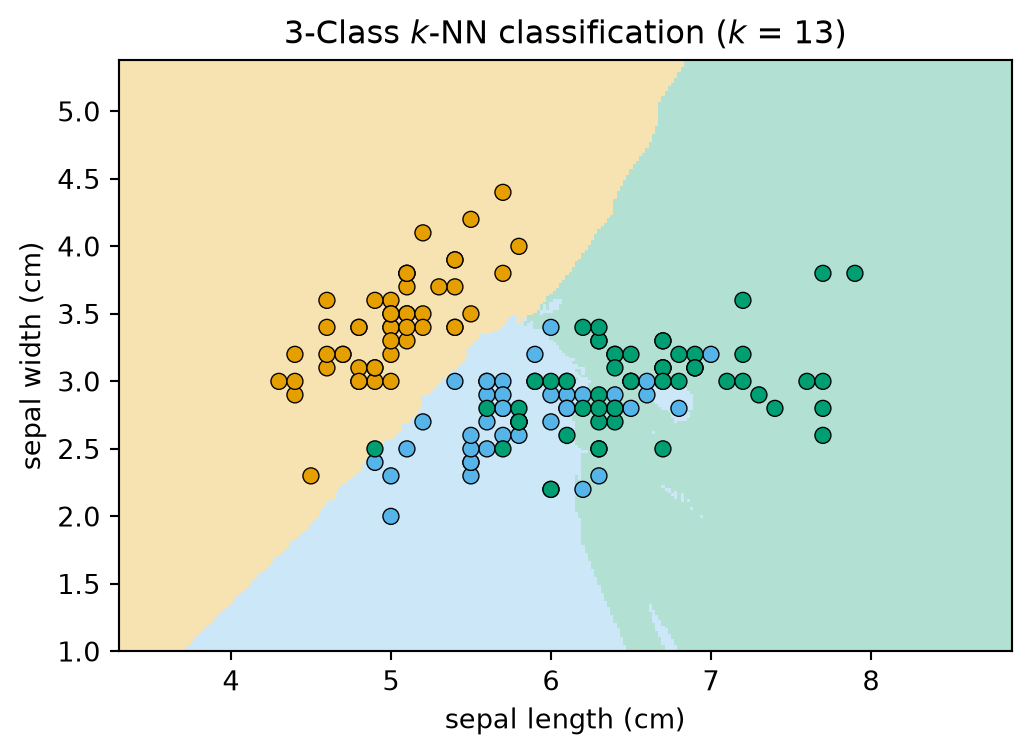
It looks like \(k\) = 13 is a reasonable value, although a case can be made that 9 and 11 are not statistically distinguishable from 13.
To gain insight into the complexity of the model for \(k\) = 13, let’s look at the decision boundary.
We will re-run the classifier on all 150 flowers using only two (of four) features, so that we can draw it.
Code
# we will use only the first two (of four) features, so we can visualizeX2 = iris.data[:, :2]h =.02# step size in the meshk =13knn = KNeighborsClassifier(n_neighbors=k)knn.fit(X2, y)# Plot the decision boundary. For that, we will assign a color to each# point in the mesh [x_min, x_max]x[y_min, y_max].x_min, x_max = X2[:, 0].min() -1, X2[:, 0].max() +1y_min, y_max = X2[:, 1].min() -1, X2[:, 1].max() +1xx, yy = np.meshgrid(np.arange(x_min, x_max, h), np.arange(y_min, y_max, h))Z = knn.predict(np.c_[xx.ravel(), yy.ravel()])# Put the result into a color plotZ = Z.reshape(xx.shape)plt.figure(figsize=(6, 4))plt.pcolormesh(xx, yy, Z, cmap=cmap3_light, shading='auto')# Plot also the training pointsplt.scatter(X2[:, 0], X2[:, 1], c=y, cmap=cmap3_bold, edgecolors='k', linewidths=0.5)plt.xlim(xx.min(), xx.max())plt.ylim(yy.min(), yy.max())plt.xlabel(iris.feature_names[0])plt.ylabel(iris.feature_names[1])plt.title(f"3-Class $k$-NN classification ($k$ = {k})")plt.show()
There are a few artifacts, though overall this looks like a reasonably smooth set of decision boundaries.
What About the Decision Tree?
The decision tree has its own complexity knob – how many leaves, or how deep, the tree may grow – and it is tuned exactly the same way: sweep the setting, score each value on validation data, read the error bars.
Lecture 08 did this on the Titanic data, and today’s in-class activity runs \(k\)-NN, Naive Bayes and a decision tree side by side on one dataset.
Handwritten Digits
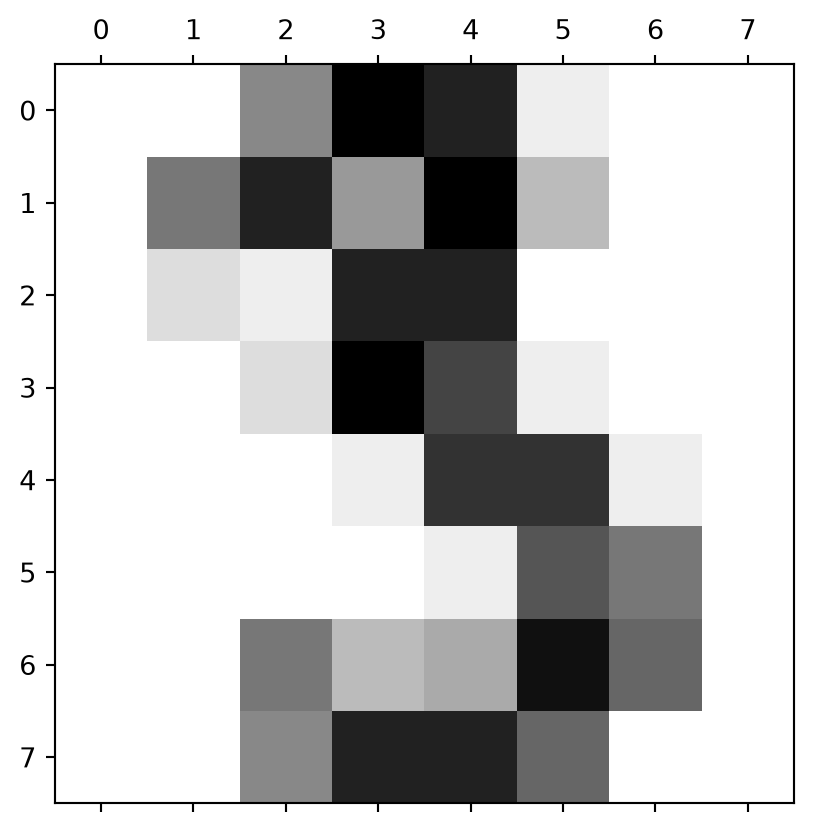
Our last dataset is scikit-learn’s load_digits: 1,797 images of handwritten digits 0–9, each only \(8 \times 8\) pixels, from the UCI machine-learning repository.
It is a small, pre-processed cousin of the famous MNIST benchmark – 70,000 images at \(28 \times 28\), built by NIST from the handwriting of Census Bureau employees and high-school students – which has been used for decades to compare classifiers. For a sample of that work see the MNIST page. Everything below would work on MNIST too, just more slowly.
for t inrange(3): plt.figure(figsize = (7, 1))for j inrange(4): plt.subplot(1, 4, 1+ j) plt.imshow(X[4*t + j].reshape(8, 8)) plt.axis('off')plt.show()
Although this is an 8 \(\times\) 8 image, we can reshape it to a vector of length 64.
To do model selection, we will again average over many train/validation splits.
However, \(k\)-NN’s prediction time grows with the training set: every query is compared with every stored point, so scoring a validation set costs (points scored) \(\times\) (training points) distance computations. On a larger dataset we might be tempted to hold out less data to speed this up.
How does the train/validation split affect results?
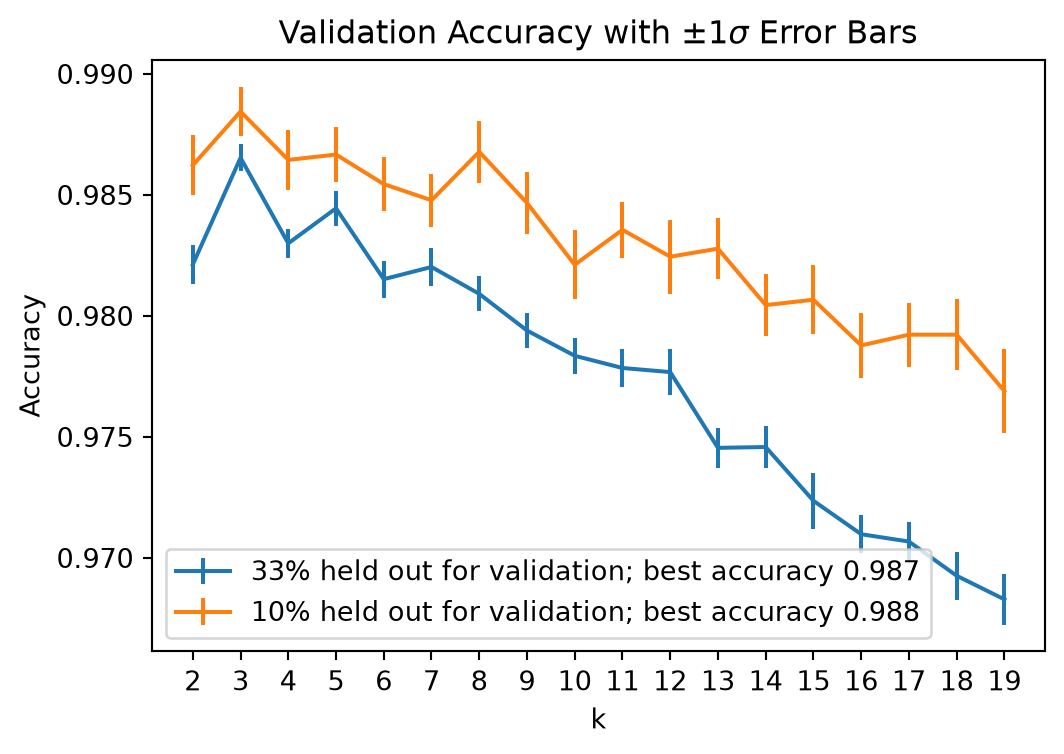
plt.figure(figsize = (6, 4))plt.errorbar(kvals, accy1, stds1, label =f'{val_fraction1:.0%} held out for validation; best accuracy {np.max(accy1):.03f}')plt.errorbar(kvals, accy2, stds2, label =f'{val_fraction2:.0%} held out for validation; best accuracy {np.max(accy2):.03f}')plt.xlabel('k')plt.ylabel('Accuracy')plt.legend(loc ='best')plt.xticks(kvals)plt.title(f'Validation Accuracy with $\\pm 1\\sigma$ Error Bars')plt.show()
These plots illustrate two principles, and the trade-off between them.
With more training data the classifier performs better: the 90/10 curve sits higher.
With less validation data the accuracy estimate is noisier: the 90/10 error bars are wider (though scoring is faster).
The decision here is which \(k\) to choose, so the 67/33 split serves us better: its tighter error bars make the choice trustworthy, even though each individual classifier is a little weaker. Having chosen \(k\), we would refit on all the data.
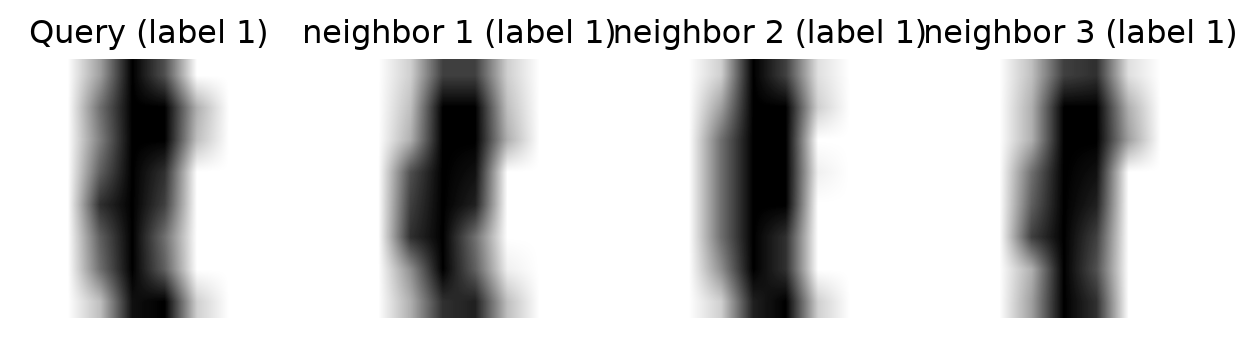
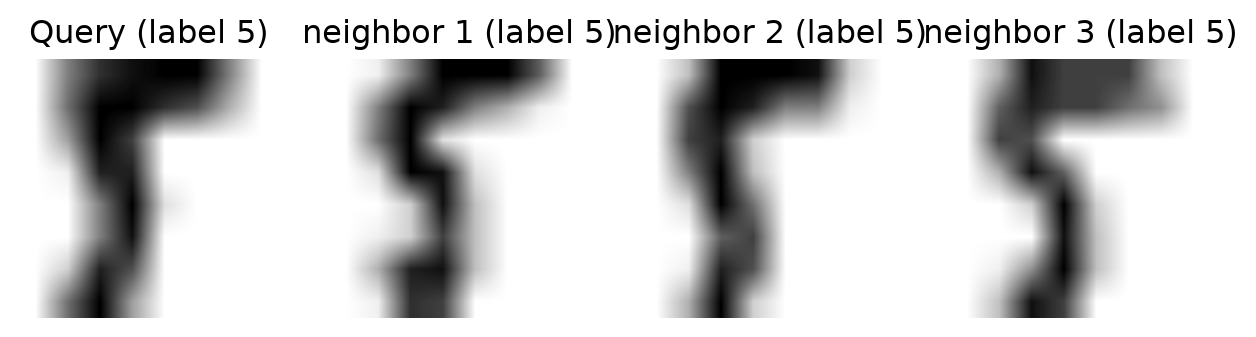
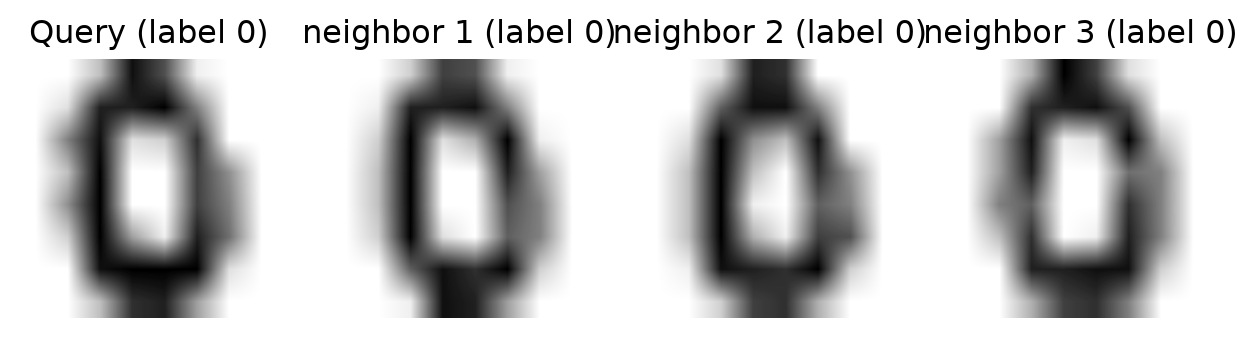
We can get a sense of why \(k\)-NN can succeed at this task by looking at the nearest neighbors of some points.
We hold the first three images out as queries and fit on the rest, so that a query cannot be its own nearest neighbour:
Code
knn = KNeighborsClassifier(n_neighbors =3)knn.fit(X[3:], y[3:])# kneighbors() indexes the fitted data X[3:], so add 3 to index into Xneighbors = knn.kneighbors(X[:3], n_neighbors=3, return_distance=False) +3print('Query labels: ', y[:3])print('Neighbour labels: ', *y[neighbors])
plt.rc("image", cmap="binary") # this sets a black on white colormapfor t inrange(3): plt.figure(figsize=(8, 2)) plt.subplot(1, 4, 1) plt.imshow(X[t].reshape(8, 8)) plt.axis('off') plt.title(f"Query (label {y[t]})")# plot three nearest neighbors from the training setfor i in [0, 1, 2]: plt.subplot(1, 4, 2+ i) plt.title(f"neighbor {i +1} (label {y[neighbors[t, i]]})") plt.imshow(X[neighbors[t, i]].reshape(8, 8)) plt.axis('off')plt.show()
Naive Bayes
\(k\)-NN classifies by distance. We close with a very different – and equally classic – way to attack the classification problem: via probability.
Given a data point \(\mathbf{x}\), we want the label \(y\). The key tool is Bayes’ rule.
Bayes Rule
Let \(A, B\) be events from a sample space \(\Omega\). Recall that Bayes’ rule states
\[ P(A \vert B) = \frac{P(B\vert A) \cdot P(A)}{P(B)}. \]
This was derived in our Probability and Statistics Refresher, and we used it in GMMs to compute the unknown\(P(A \vert B)\) from known\(P(B\vert A)\), \(P(A)\), and \(P(B)\).
Using Bayes Rule in a Classifier
Let’s start with a simple example
A doctor knows that meningitis causes a stiff neck 75% of the time, i.e., \(P(S\vert M) = 0.75\)
If a patient comes in with a stiff neck, what is the probability she has meningitis, i.e., what is \(P(M\vert S)\)?
We only currently know \(P(S\vert M)\) so we would need additional information to compute \(P(M\vert S)\).
If the doctor also knows the following information
1 in 20 people in the population have a stiff neck at any given time, i.e., \(P(S) = 0.05\)
1 in 10,000 people in the population have meningitis at any given time, i.e., \(P(M) = 0.0001\)
The problem: estimating \(P(x_1, \ldots, x_d\vert C_i)\) from data directly is hopeless – with \(d = 20\) features of 10 values each, that is a histogram with \(10^{20}\) bins per class.
The “Naive” Assumption
Naive Bayes assumes the attributes are conditionally independent given the class:
This is naive – features are rarely independent – but it turns \(10^{20}\) bins into \(20 \times 10\), and it works surprisingly well in practice.
Train: estimate each \(P(x_j\vert C_i)\) and each \(P(C_i)\) from the training data (histograms for discrete features; e.g. a Gaussian per class for continuous ones).
Predict: for each class compute \(P(C_i)\prod_j P(x_j\vert C_i)\) and return the largest.
Worked Example
Classify a new taxpayer with Refund = No, Married (ignoring income).
From the table, P(Evade=No) = 7/10 and P(Evade=Yes) = 3/10, and
Note the zero: one empty histogram bin wipes out every other factor. A single value never seen with a class vetoes that class, however strong the rest of the evidence.
Laplace Smoothing
The fix is to pretend we saw every value once more than we did: add 1 to each count, and the number of possible values to each denominator.
Marital status has three values and Refund two. For Evade = Yes (3 rows) and Evade = No (7 rows):
Still Evade = No, but now by a 5-to-1 margin rather than by a veto – one more piece of evidence for Yes could change the answer, as it should.
Why Naive Bayes Dodges the Curse
\(k\)-NN needs the training data to be dense in \(\mathbb{R}^d\) – a genuinely close point near every query – and we saw that this takes exponentially many points.
Naive Bayes never measures a distance. For each class it estimates \(d\)one-dimensional histograms (or \(d\) one-dimensional Gaussians), one per feature, and every one of them is estimated from all\(n\) training points.
So the data it needs grows linearly in \(d\), not exponentially: 1,000 binary word features in a spam filter need about 1,000 numbers per class, each a simple count.
The price is the independence assumption. Features are rarely independent, so the probabilities NB reports are usually wrong – but only the arg max has to be right, and in practice it often is.
That is Naive Bayes in a nutshell:
classification via probability and Bayes’ rule,
training is just counting (or fitting a simple density) per feature and class, smoothed so that no count is zero,
it scales to high dimensions because it estimates \(d\) one-dimensional distributions instead of one \(d\)-dimensional one – the independence assumption that makes this possible is also its principal weakness.
The full treatment, including continuous features and Support Vector Machines, is in Naive Bayes and SVM.